Aug 27, 2021

System.TypeException: Cannot have more than 10 chunks in a single operation. Please rearrange the data to reduce chunking.

 System.TypeException: Cannot have more than 10 chunks in a single operation. Please rearrange the data to reduce chunking.

Cause:   
If  we are doing DML operation on collection of sobject in single operation.
1. More the 10 Sobjects 
List<Sobject> dmlList = new List<Sobject>();
dmlList.add(New Account (Name='Test'));
dmlList.add(New Contact (LastName='Test'));
dmlList.add(New Lead (Name='Test'));
dmlList.add(New opportunity (Name='Test'));
dmlList.add(New custom1__c (Name='Test'));
dmlList.add(New custom2__c (Name='Test'));
.
.
.
dmlList.add(New custom11__c (Name='Test'));
insert dmlList;
        2. Less than 10 Sobjects and  records in not in order
List<Sobject> dmlList = new List<Sobject>();
dmlList.add(New Account (Name='Test'));
dmlList.add(New Contact (LastName='Test'));
dmlList.add(New Lead (Name='Test'));
dmlList.add(New Account (Name='Test'));
dmlList.add(New Contact (LastName='Test'));
dmlList.add(New Lead (Name='Test'));
.
.
.
dmlList.add(New Account (Name='Test'));
dmlList.add(New Contact (LastName='Test'));
dmlList.add(New Lead (Name='Test'));
insert dmlList;
Solution:
SImply Use SORT() method
dmlList.sort();
insert dmlList;
(OR)
List<Sobject> dmlList = new List<Sobject>();
dmlList.add(New Account (Name='Test1'));
dmlList.add(New Account (Name='Test2'));
.
.
dmlList.add(New Account (Name='Test11'));
dmlList.add(New Lead (Name='Test1'));
dmlList.add(New Lead (Name='Test2'));
.
.
dmlList.add(New Lead (Name='Test11'));
dmlList.add(New Contact (LastName='Test1'));
dmlList.add(New Contact (LastName='Test2'));
..
..
dmlList.add(New Contact (LastName='Test11'));
insert dmlList;

Jun 29, 2021

Salesforce Apex Coding Standards

                Salesforce Apex Coding Standards

Coding Style

*      Indentation

·         Whitespace - Since Apex is case insensitive you can write it your way. However, to increase readability, use four spaces instead of tabs for indentation.

·         New Line – To increase readability – Use new line at starting point for every new block.

*      Naming conventions (Pascal, Camel Case, snake_case etc.)

·         Apex Class names should be in UpperCamelCase, with the first letter of every word capitalized.

§  Eg: AccountTriggerHandler 

·         Methods should be verbs in lowerCamelCase or a multi-word name that begins with a verb in lowercase; that is, with the first letter lowercase and the first letters of subsequent words in uppercase.

§  Eg: getParentAccount()

·         Variables: Local variables, instance variables, and class variables are also written in lowerCamelCase.

§  Eg: Integer index, String accountName.

·         Final Varibale should be CAPITAL. Eg: final Integer BATCHSIZE=20.

·         Variable names should not be single characters.

·         Test Class name should be as PascalCaseTest.  i.e. – AccountTriggerHandlerTest

·         Test method should be as testShouldExecute<ClassName>When<data>

§  Eg: testShouldExecuteAccountTriggerHandlerWhenAddresschanged()

·         Datatype should be UpperCamelCase

§  Eg: String, Integer, List, Map, Wrapper, Account, etc.

·         Boolean values Should be CAPITAL i.e., TRUE or FALSE.
 

*      Minimal comments - unless VERY temporary

ü  Remove the commented code as this is always a blocker, while going through the code.

ü  Comments should tell WHY not WHAT.

ü  Git tracks history so no need to comment code.

*      Use same conventions within a Class.

Example: instantiating an sObject using the sObject constructor vs the object.field notation

 SBQQ__Quote__c quote1 = new SBQQ__Quote__c (

SBQQ__Opportunity2__c = opp1.Id,

 SBQQ__MasterContract__c = c.Id,

 SBQQ__Primary__c = TRUE

);

multiQuoteList.add(quote1);

Vs

SBQQ__Quote__c quote1 = new SBQQ__Quote__c ();

quote1.SBQQ__Opportunity2__c = opp1.Id;

quote1.SBQQ__MasterContract__c = c.Id;

quote1.SBQQ__Primary__c = TRUE;

multiQuoteList.add(quote1);


Doesn't matter which convention you use, just keep it consistent within the class.

*      Should not have methods with large number of lines.

ü  Make sure each method contains not more than 40 lines.

ü  If there are more lines break into multiple methods.

ü  Classes no more than 10 methods or 300 lines.

ü  Don't add unnecessary code. Only the code needed to achieve the feature you are working on

*      Break SOQL Queries across multiple lines

·         SELECT keyword and clauses such as WHERE, WITH, GROUP BY, and ORDER BY, etc. all should be in CAPS.

·         Need to Break/new line for each clause.

·         List all fields in ascending alphabetical order.

[ Select Id, Name, customField1_c, customField2_c from Account where Name like '%Nave%' ]

·         Bad Practice

·         Good Practice

[ SELCT Id, Name, customField1_c, customField2_c

 FROM Account

 WHERE Name like '%Nave%' ]


*      No System.debug Statements

ü  Unless you absolutely need to debug something in Production.

ü  This also include Javascript console.log statements in front-end code.


Coding best practices

*      Keep It Simple Stupid (KISS Principle)

ü  There should be as little logic in your code as possible.

ü  Write a single method and reduce the clutter in your code.

ü  Simple code is easier to maintain.

ü  Bad Practice


ü  Good Practice


*      Don’t put SOQLs inside loops.

ü  Bad Practice


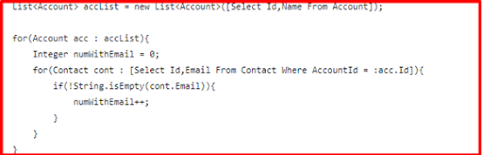
ü  Good Practice


*      Utilize the Maps for Queries

ü  Map<Id, sObject> myAwesomeMap = new Map<Id,sObject>(List of sObjects or SOQL Query);

*      Use relationships to reduce queries.


*      Don’t put DMLs in loops.


*      Test code coverage

ü  Cover as close to 100% of the code as possible.

ü  Never use dummy code coverage

*      Write meaningful unit tests.

ü  Create all test data before calling the Test.startTest method.

ü  Must have System.Assert for each test method.

ü  Include a description of expected behaviour as 2nd parameter for System.assert() or 3rd parameter for System.assertEquals()

ü  Examples:

ü  System.assert(A == B,’A does not equal B’);

ü  System.assertEquals(Expected,Actual,’Actual does not equal Expected’);

ü  System.assertNotEquals(Expected,Actual,’Actual equals Expected, but should not’);

*      Reusability

ü  Avoid duplicated code (more-so in same class than across classes)

ü  Use existed Trigger Framework, TestDataFactory and HTTPMOCKClasses

ü  One Object should have one Trigger only

*      Avoid Hardcoding IDs:

ü  Use Custom Settings, metadata types or custom Labels. (Or)

ü  Get values dynamically

ü  Bad Practice


ü  Good Practice


*      The fewer the method parameters the better

ü  Try to avoid more than 3 arguments


May 31, 2021

Can't Make A Callout to Own Salesforce from Lightning Component

 Making API Calls from Apex(☑️ )/Java Script(❎)

  • We can Make API calls from an Apex controller. You can’t make Salesforce API calls from JavaScript code.
  • For security reasons, the Lightning Component framework places restrictions on making API calls from JavaScript code. To call third-party APIs from your component’s JavaScript code, add the API endpoint as a CSP Trusted Site.
  • To call Salesforce APIs, make the API calls from your component’s Apex controller. Use a named credential to authenticate to Salesforce.

Note:

    By security policy, sessions created by Lightning components aren’t enabled for API access. This prevents even your Apex code from making API calls to Salesforce. Using a named credential for specific API calls allows you to carefully and selectively bypass this security restriction.
    The restrictions on API-enabled sessions aren’t accidental. Carefully review any code that uses a named credential to ensure you’re not creating a vulnerability.

May 23, 2021

Summer ’21


LWC Quick Actions:

    We can now use Lightning Web Components as Quick Actions! While you can currently do this with Aura Components, this new implementation brings some great new features! First off, there are TWO different types of LWC Quick Actions 

  1. Screen Actions and
  2. Headless Actions. 

Referece Link : Click Here


Aura Components in the ui Namespace Are Deprecated

  • Salesforce is ending support for Aura components in the ui namespace on May 1, 2021
  • Migrate to Lightning Web Components (LWC) whenever possibl
  • Replace the deprecated components with their counterparts in the lightning namespace.
  • These components are faster, more efficient, and they implement Lightning Design System styling out-of-the-box.

Example:

ui:actionMenuItem

Use lightning:menuItem with lightning:buttonMenu instead.

When migrating to Lightning Web Components, use lightning-menu-item with lightning-button-menu.

ui:inputText

Use lightning:input with text type instead.

When migrating to Lightning Web Components, use lightning-input with text type. 


Referece Link : Click Here 


May 20, 2021

USER PASSWORD FLOW


 USER PASSWORD FLOW


 API Authentication mechanism for Salesforce System 

Salesforce APIs are authenticated. These APIs are accessible through the OAuth 2.0 Password authentication flow. 

  • {Domain} maybe
    • Test.salesforce.com --> Sandbox
    • Login.salesforce.com --> production


API URL:
https://{Domain}/services/oauth2/token 

Access Mechanism: OAuth2.0. 

Request Method: POST 

Request from third party : 

Request from Third Party System


Attribute Name 

Value

Type

grant_type 

password (should be as it is)

String

username 

TBD

String

password 

TBD (if required append Security Token)

String

client_id 

TBD

String

client_secret 

TBD

String


Success Response from Salesforce: 

Response from Salesforce


Attribute Name 

Description 

Type

access_token

Access token that acts as a session ID that the application uses for making requests. This token should be protected as though it were user credentials.

String

signature 

Base64-encoded HMAC-SHA256 signature

String

issued_at

When the signature was created, represented as the number of seconds since the Unix epoch (00:00:00 UTC on 1 January 1970)

String

instance_url 

Identifies the Salesforce instance to which API calls are sent 

String

id 

Identity URL

String


Error Response from Salesforce:

Response from Salesforce


Attribute Name 

Description 

Type

error

Error code (unsupported_response_type/ 

invalid_client_id/ invalid_request/ 

invalid_client_credentials / invalid_grant/ 

inactive_user/ inactive_org/ rate_limit_exceeded)

String

error 

description 

Error Description

String